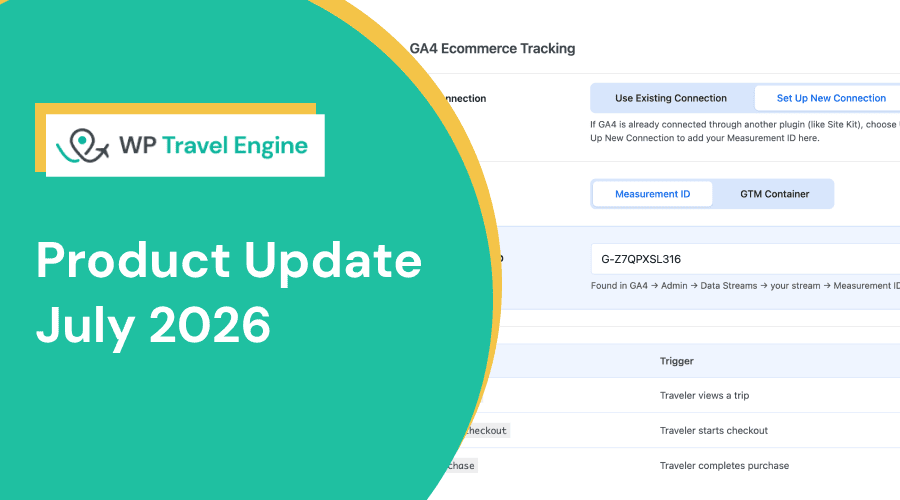
This month’s update introduces the new GA4 eCommerce Tracking add-on, so you can see exactly how travelers move from viewing a trip to completing a booking.
It also brings new coupon settings and seat limits per pricing category, along with several other improvements and bug fixes.
Here’s what’s new:
GA4 eCommerce Tracking Add-on
Relevant if: You want to see where bookings come from and where travelers drop off, without setting up tracking by hand.
Why we built this:
Booking numbers only tell part of the story. They don’t show which trips travelers viewed first, which marketing campaigns brought them in, or where they left before completing a booking.
Getting that information into Google Analytics 4 usually requires manual event tracking.
The new GA4 eCommerce Tracking add-on removes that work.
You can connect using your existing Google Analytics or Google Tag Manager. Whether you’re already using Google Analytics or setting up a new property, you can get started in just a few steps.
Once connected, the add-on automatically tracks key eCommerce events, including:
- view_item when a traveler views a trip
- begin_checkout when they start the booking process
- purchase when they complete a booking
See this data alongside your existing GA4 reports for traffic, campaigns, devices, and locations.
Two New Additions to Coupons
Two new settings have been added to Coupons: Limit a coupon to specific departure dates and promote active coupons across your site.
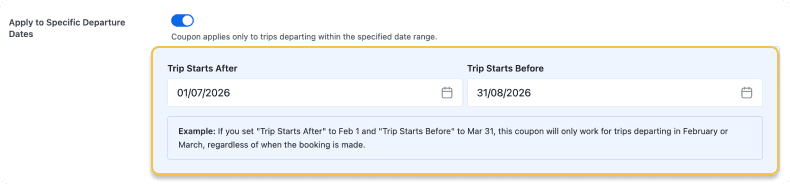
Apply to Specific Departure Dates
Set a start and end date for your coupon. Travelers whose departure falls within that window get the discount, regardless of when they book.
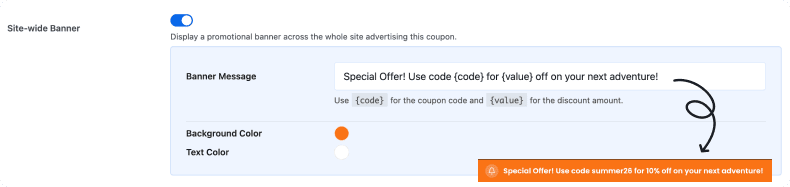
Site-wide Banner
Travelers are more likely to book when they know a discount is available. Display your active coupons across your site so every visitor sees them while browsing.
Manage Capacity by Traveler Type
Until now, you could only set a seat limit for the whole trip. If a trip had 30 seats, there was no way to control how many of those went to each traveler type.
You can now assign a separate capacity to each pricing category. For example, allow 20 adult bookings and 10 child bookings. Once one category reaches its limit, bookings for the others remain available until their own limits are reached.
Example: You run a family trek with a total of 30 seats. You can now set the limit as 10 for children and 20 for adults. Once the child seats are full, only adult seats remain open.
46+ Payment Gateways via PayLexer
Many tour operators serve travelers from different countries, but payment options can sometimes feel limited.
Some gateways work better in certain regions, while others depend on bank support or customer preference. Adding a new one usually means custom work or complex setup.
PayLexer helps you handle this without changing your existing setup.
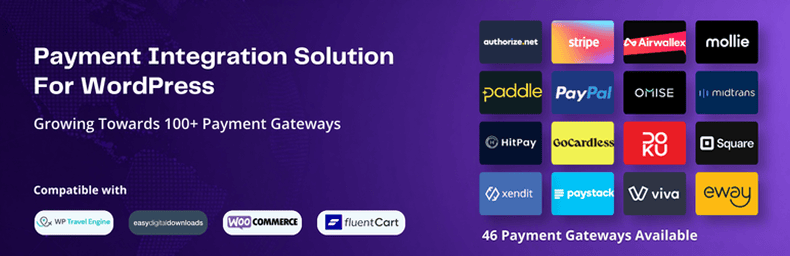
It works alongside WP Travel Engine and lets you connect multiple payment gateways without coding. You can choose the gateway that fits your business and start accepting payments in minutes.
The list currently includes 46 payment gateways and continues to grow. Here are some of the new payment gateways:
- Culqi
- Nexi Nets
- My Fatoorah
- Fatora
- Checkout.com
- Conekta
- Pin Payments
- Fast Spring
- Global Payments
- PayU
- GetPayIn
- M-Pesa
- MercadoPago
If the gateway you need isn’t available yet, you can request it directly from the PayLexer website.
Other Improvements
Our core plugin:
- Onboarding now takes less than three minutes to complete.
- Trip cards and single trip pages can show a pricing type label, such as “Per Person,” next to the price.
- The duration filter slider uses smart formatting, showing trips under 24 hours in hours and longer trips in days.
- Session handling has been improved to prevent unnecessary cookie creation.
- Validation checks for merchant and payment information in PayPal Standard payments have been strengthened.
- The coupon edit page has been redesigned for easier management.
Trip Reviews:
- Spam and Not Spam action buttons have been added for each review and reply in the admin review list.
- Client name and email fields are now optional when creating or editing reviews in the admin panel.
Webhooks and API:
- A webhook logs interface has been added to monitor webhook deliveries and troubleshoot issues from the admin dashboard.
Trip Fixed Starting Dates:
- Weekly time slots are now migrated to Fixed Starting Dates on first activation, for hour-based trips.
Bug Fixes
Alongside new features, we’ve resolved several issues across bookings, payments, webhooks, and trip search.
These fixes are included automatically when you update.
- Checkout no longer fails in Safari due to a verification error.
- Trip search filters now stay scoped to the current taxonomy archive page when sidebar filters are applied.
- Bookings made with offline payment methods now trigger Zapier webhooks when event-based triggers are enabled.
- Custom form fields are no longer missing from webhook payloads.
- Discount and coupon details are no longer missing from API and webhook responses.
- Authentication conflicts with third-party Basic Authentication plugins used by automation tools have been resolved.
- Booking data now reaches automation platforms such as Ottokit.
- Itinerary day duration is now visible in the Trip Editor.
- PDF exports now support the FAQ category format.
- A coupon trip restriction validation bypass has been patched.
- Validation checks have been strengthened to prevent unauthorized modifications to system settings.
- An Insecure Direct Object Reference (IDOR) vulnerability in trip package deletion has been patched.
- Gutenberg block content is now detected for translation in WPML across all plugin blocks.
- FAQs from trip pages and Global Settings are now available for translation in WPML.
- The Trip Highlight section now displays correctly even when the Overview section is empty.
Conclusion
Update to the latest version of WP Travel Engine to start using these improvements.
If you’re ready to gain deeper booking insights, the new GA4 eCommerce Tracking add-on is available now.
As always, our support team is here if you need help getting started.