
This month’s update introduces Altus AI, an AI integration that lets you connect your favorite AI tools to WP Travel Engine and manage trips using plain-language prompts.
It also brings the new Resource Management add-on for setting limits on rooms and extra services, and a new way to schedule trips by a specific weekday within the month.
Plus, we’ve made several other improvements and fixed several bugs.
Here’s what’s new:
Altus AI
Altus AI connects your favorite AI tool, like Claude, ChatGPT, or Gemini, directly to your WP Travel Engine site. From there, you can manage trips and generate content using plain-language prompts.
Altus AI currently includes two modules:
- Content Generation drafts or rewrites a trip’s overview, itinerary, highlights, and FAQs from inside the trip editor.
- The MCP Connector lets you update prices, create packages, and run coupons by asking, in plain language.
Two more modules are on the way: an AI Trip Assistant to answer traveler questions, and Altus Agent to take action on your site directly from the dashboard.
You'll need your own API key from OpenAI, Anthropic, Google, or OpenRouter to use Altus AI.
Resource Management Add-on
Perfect for: Tour operators using the Accommodation or Extra Services add-on who manage rooms, vehicles, or services shared across multiple trips.
Resource Management lets you set capacity limits for accommodations and extra services. Once a room or service hits its limit, it closes automatically, even when several trips share the same inventory.
Set different capacity limits for peak and off-season periods. See which rooms and services are available, booked, or full from one place.
You'll need the Accommodation or Extra Services add-on installed to use Resource Management.
Weekday-Based Monthly Recurrence
Before, you had two ways to repeat Fixed Starting Dates:
- Every week on a specific weekday, like every Saturday.
- Every month on a fixed date, like the 15th.
But you couldn’t schedule trips based on a weekday’s position in the month, like the first Saturday, third Wednesday, or last Sunday. You had to add each date manually.
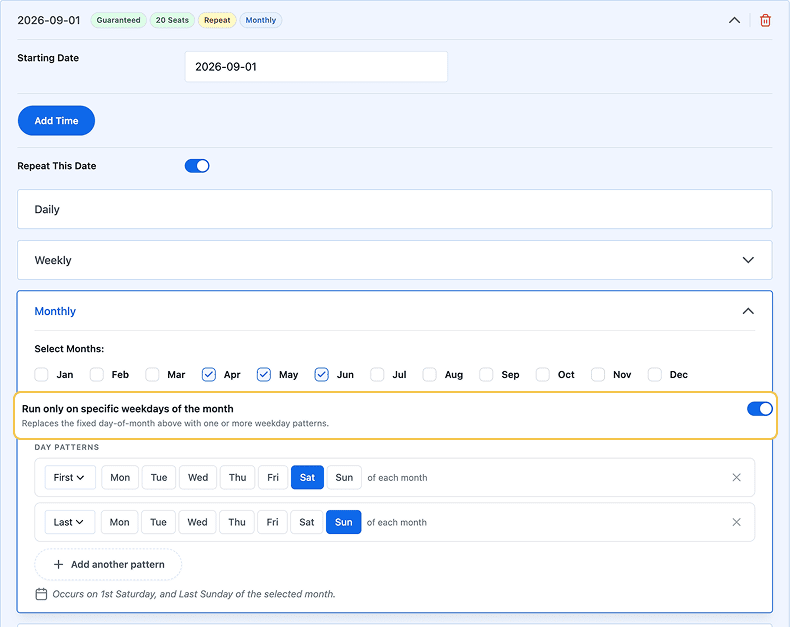
Now, you can create the starting date once, choose the months you want it to repeat, and select a pattern like the first Saturday, second Tuesday, or last Sunday. The system automatically creates those starting dates for you.
72+ Payment Gateways via PayLexer
You now have 72 payment gateways to choose from in WP Travel Engine through PayLexer.
Here are some of the new payment gateways:
If the gateway you need isn’t available yet, you can request it directly from the PayLexer website.
Other Improvements
WP Travel Engine
- Refunded amounts are now tracked through the Booking Edit section.
- The time slot picker now follows the WordPress time format setting, 12-hour or 24-hour.
- Trip packages now sync translations and offer better package management for translated trips.
- Trip Listing page filters like Destination or Activities now update result counts as selections are made.
- Trip Package pricing can now require a price category to be selected for a booking.
- Warning and info notice colors that appear on your website can be customized.
- WP Travel Engine is now compatible with the Members plugin for you to manage role-based permissions. For example, give a staff member permission to edit trips, without giving them access to payments or customer data.
Activity Tour Booking Add-on
- Time slots now follow the WordPress time format setting, 12-hour or 24-hour.
Extra Services Add-on
- The Extra Services tab in the booking modal now disables for trips with no extra services.
- Extra Services can now be duplicated to create a copy of an existing service.
- The Extra Services step in the booking form now supports a customizable description.
- A Select All checkbox is now available for advanced Extra Services.
- Advanced Extra Service sub-options can now be reordered by dragging on the trip edit page.
Form Editor Add-on
- A new Date of Birth field is now available. Travelers can type their birthdate directly in the format (MM/DD/YYYY or DD/MM/YYYY) set by the admin.
Per Trip Emails Add-on
- Per-trip email configuration can now be enabled for private tours.
Price on Request Add-on
- The mobile toggle button now shows the section title.
- The Price on Request modal now follows the global Booking Modal sticky settings.
- The configured price is now included in the generated schema structured data, for improved SEO.
SliceWP Integration Add-on
- URL redirections have been optimized for smoother navigation.
Trip Fixed Starting Dates Add-on
- In Trip Departure Calendar, departures that only accept waitlist entries now show a Join Waitlist button instead of View Details.
Bug Fixes
- Layout issues in the trip edit form fields have been resolved.
- An Insecure Direct Object Reference (IDOR) vulnerability has been patched.
- Shared room booking state now reflects the effective sharing configuration.
- Renaming a Global Extra Service now updates its name across every trip where it’s used.
- The Increase Counter option in the booking modal now enables as expected.
- The Show More Dates button no longer disappears when used with a shortcode.
- Free pricing categories no longer affect per-group pricing with group discounts.
- A layout issue on the Single Trip page caused by the Trip Search Block in the sidebar has been resolved.
- The booking modal no longer closes unexpectedly when reaching the Extra Services tab with Optimize Loading enabled.
- Cloned private trips are now correctly treated as private trips.
Conclusion
This month’s updates give you AI tools for content and trip management, and better control over shared accommodation and service inventory.
Update WP Travel Engine to the latest version to get started. If you have any questions along the way, our support team is here to help.


