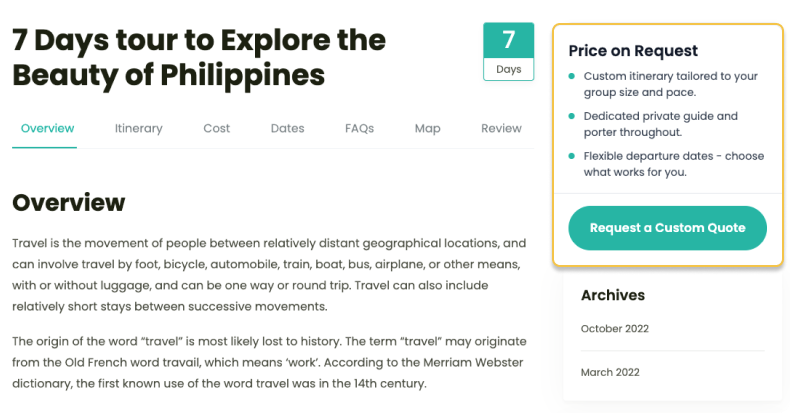
This month’s update introduces the new Price on Request add-on for trips without fixed pricing.
It also brings improvements to the Accommodation, Trip Reviews, and Fixed Starting Dates add-ons, along with several bug fixes and performance enhancements.
Here’s what’s new:
Price on Request Add-on
Perfect for: Custom itineraries, luxury tours, private groups, and trips where pricing depends on travelers’ requirements.
Why we built this
Some trips don’t fit a booking form.
Maybe the itinerary changes based on the customer’s preferences. Maybe the final cost depends on group size, accommodation choices, or additional services. In these cases, displaying a fixed price can create confusion or stop potential customers from getting in touch altogether.
That’s why we’ve introduced the new Price on Request add-on.
Instead of showing a price, you can invite travelers to submit an enquiry with their requirements. You review their request, prepare a personalized quote, and continue the conversation from there.
Block Specific Time Slots in Fixed Starting Dates
Relevant if: You run trips with multiple daily departures and need to close off specific time slots on certain dates, not the entire date.
Until now, excluding a date in your departure dates blocked the whole day.
If you wanted to close a morning slot but keep the afternoon open, there was no way to do that without removing the date entirely.
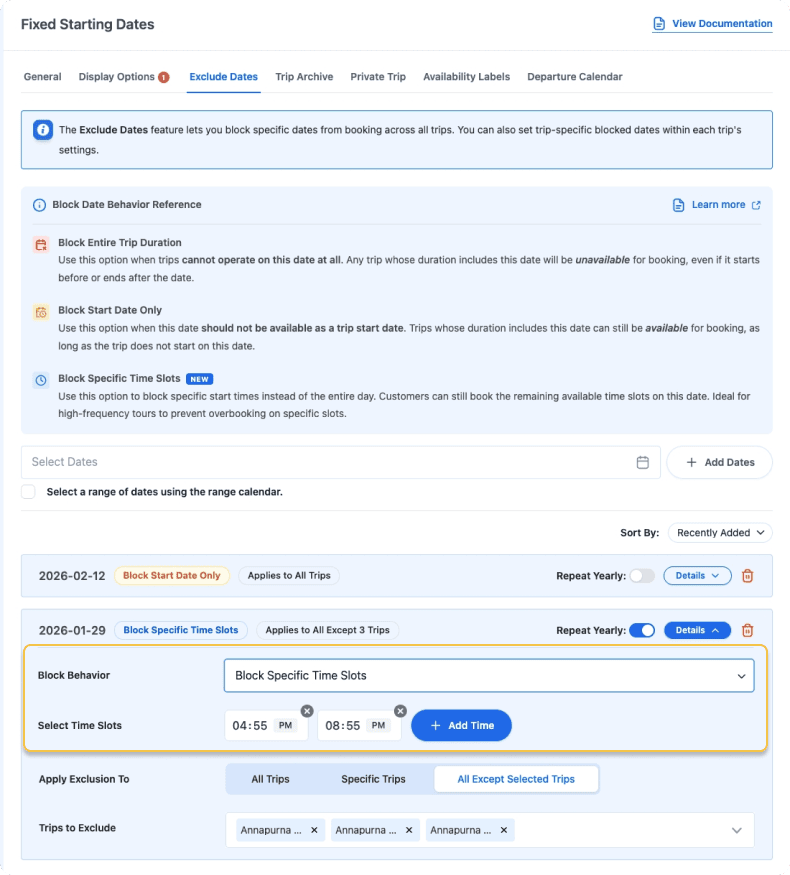
You can now block individual time slots within excluded dates. The rest of the day stays open, and you avoid bookings on slots you can’t fulfill.
Example:
You run two daily departures every day:
- 8 AM
- 2 PM
Your morning guide becomes unavailable for one particular date.
Instead of closing bookings for the entire day, you simply block the 8:00 AM departure while keeping the 2:00 PM departure available for booking.
Room Sharing in Accommodation
Perfect for: Tours with shared accommodation or limited room inventory.
Until now, travelers from different bookings had no way to share a room. If a room fits three travelers, all three have to be on the same booking. If they weren’t, they couldn’t book at all.
Now, that room can be filled by travelers from different bookings. Each traveler pays for their own share. You decide which rooms allow shared bookings.
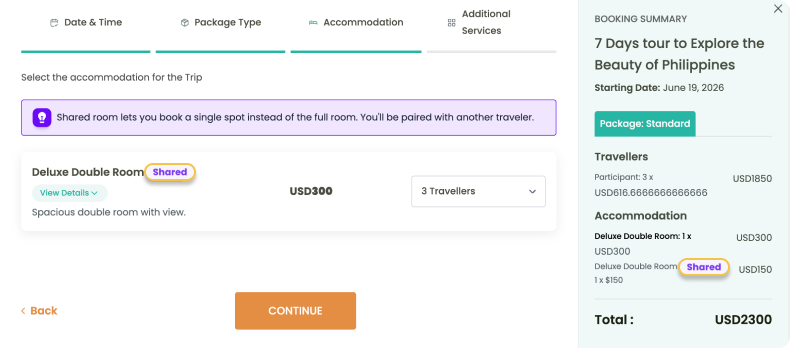
Example:
Your single rooms are fully booked, but you still have space in a twin room.
Instead of declining another solo traveler, you allow them to reserve the twin room on a shared basis.
Later, another traveler booking independently can reserve the remaining bed.
This helps you maximize occupancy while giving travelers more booking options.
Other Improvements
Trip Reviews:
- A single review can now be assigned to more than one trip.
- The admin interface has been refreshed with a cleaner, modern layout.
- Review browsing now supports a combination of Load More and infinite scrolling.
- reCAPTCHA protection has been added to the review form to block spam.
WooCommerce Payments:
- Gateway settings now support REST API access with improved update handling.
- Trip featured images now sync with their corresponding WooCommerce products.
Custom HTML in Custom Booking Link:
You can now replace the default booking button with your own embedded form or widget.
Trip Fixed Starting Dates:
- You can now show or hide expired trips across archives, search results, blocks, and Elementor widgets.
- The Departure Calendar now offers a clearer empty-state experience with improved multilingual support.
- Private trips are now automatically excluded from the Departure Calendar.
- You can now sort departure dates on the Trip Edit page by Recently Added, Newest, or Oldest. This is a display-only option to help you find dates faster.
Bug Fixes
Alongside new features, we’ve resolved several issues across bookings, payments, availability, accommodation, reviews, translations, and security.
No setup is needed for any of these – they’re fixed automatically.
- Cart data is now saved in WooCommerce orders, preventing booking creation failures after payment.
- Bookings are no longer created when payments fail, preventing duplicate bookings.
- Total cost now updates for custom pricing types in the Activity Tour booking form.
- The minimum travelers warning is removed once the required participant count is selected.
- Valid email addresses with modern domain extensions are no longer rejected in the Itinerary Downloader.
- The “Load more” button in Trip Reviews now works when the review form is hidden.
- The trip date filter now hides sold-out trips, showing only available dates.
- The Departure Calendar now shows “Sold Out” for fully booked fixed departures instead of “0 Spots Available.”
- Enquiry forms now show an error message if an enquiry cannot be sent.
- Sold-out departure months no longer appear as available in trip availability listings.
- A security issue in profile image upload validation was patched. No action needed – it was applied automatically with this update.
Conclusion
This month’s updates help you win bookings that don’t fit a fixed price and give you tighter control over your availability and accommodation.
Update WP Travel Engine to the latest version to get started. If you have any questions along the way, our support team is here to help.