If you run a travel or tour business, you have probably searched for the best tour booking WordPress plugin more than once, usually while frustrated with your current setup.”
Someone messages you at 11 pm asking if Saturday’s trip still has space, and you cannot answer until morning. By then, they had already booked somewhere else.
A good tour booking plugin fixes this. It lets people see your tours, check availability, pick a date, pay online, and get a confirmation, all without you touching a single email. The booking happens whether you are asleep, on a trek with no signal, or busy running today’s tour group.
But picking the right one is not simple. Dozens of plugins claim to be the best, and most of them look the same on the surface, with similar screenshots and similar promises.
In this article, we will go through the plugins that actually matter in 2026, what they are good at, what they struggle with, and how much they cost. By the end, you should know exactly which one fits your business.
Why this decision matters more than it looks
It’s easy to think of a booking plugin as a small technical tool that you set up once and forget. But in reality, it plays a big role in turning your website visitors into paying customers.
Think about what happens when someone lands on your site looking for a trek in Nepal or a day tour in Sydney. If they cannot see real-time availability, they either message you and wait, or they leave and check a competitor’s site instead.
If your checkout only takes bank transfer, some customers will abandon the booking rather than deal with the extra step.
If your site cannot show a proper itinerary with day-by-day details, customers cannot judge if the trip fits what they want, and they leave with questions instead of a confirmed booking.
These are not small issues. They affect the moment when a visitor decides to book, so the booking plugin you choose directly impacts how many visitors become paying customers, not just how easy it is to manage bookings.
What a tour booking plugin actually needs to do
Before comparing plugins, it helps to know what to look for. A basic booking form is not enough anymore. Here is what matters for a real travel business:
- Ability to create tour packages with images, itineraries, and pricing
- Calendar-based availability so customers see open dates instantly
- Support for group bookings and per-person pricing
- Online payments through gateways like Stripe, PayPal, or local options
- Coupon codes and seasonal pricing
- Emails and reminders are sent automatically after booking
- Reports so you know which tours are selling and which are not
- Private Trips: Offer exclusive private tour options for a personalized experience.
- Accommodations: Accommodation options like shared, standard, deluxe, or private stays directly at booking
- Scalable: Offers multiple plans to switch as your business grows.
- Mobile-friendly checkout, since a large share of travel research and booking now happens on phones
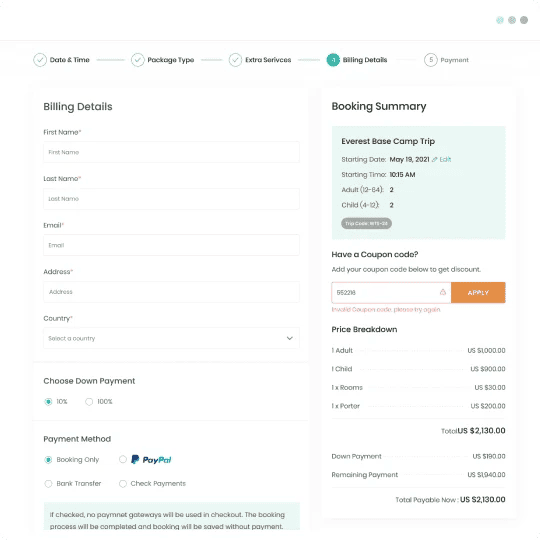
Keep this list in mind. Some plugins on this page do all of it. Others only do half. Below is the list with the real features and pricing for each one.
1. WP Travel Engine
WP Travel Engine is a WordPress plugin built specifically for tour and travel booking. It is used on more than 20,000 active websites in over 100 countries, which puts it among the most widely used booking plugins for this niche.
It also holds a 4.9 out of 5 rating from more than 550 reviews on WordPress.org, which is a strong signal for a plugin used by thousands of live businesses.
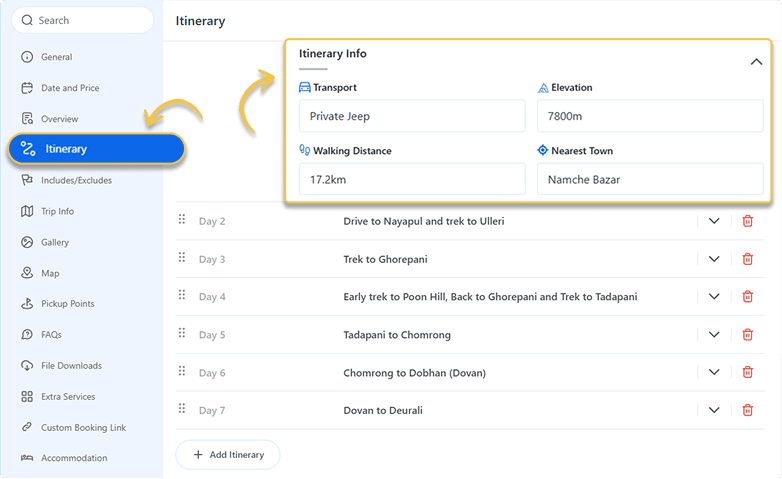
Here is what you actually get with it:
- Multi-day itinerary builder. You can lay out a trip day by day, with descriptions, activities, and images for each day, instead of one long block of text.
- Group and per-person pricing. Prices can change automatically based on how many people are booking, which is common for treks and group tours.
- Real availability calendar. Customers see which dates are open and which are full, so you stop getting booking requests for sold-out trips.
- Built-in payment gateways. It connects with widely used gateways so customers can pay online at checkout, without you handling payment manually.
- Traveler detail collection. At checkout, it can collect passport details, emergency contacts, or any custom field you need for a trip, which most generic booking plugins do not offer.
- Add-ons for growing agencies. As your business grows, you can add features like abandoned cart recovery, review collection, or multi-vendor support without switching to a different plugin.

For an agency in Australia or Nepal running a handful of trekking or tour packages, this kind of detail matters. You are not forcing a product-based plugin to behave like a travel booking system. It already thinks in terms of trips, group sizes, and itineraries, because that is what it was built for from the start.
There is also the question of setup time. A plugin that technically supports everything you need is not much use if it takes a developer two weeks to configure. WP Travel Engine is built to be set up by the business owner directly, without needing to hire someone.
You add a tour, set the itinerary, set pricing, connect a payment method, and it is live. For a small agency running the business alone or with one or two staff, this saves real time and money that would otherwise go toward hiring a developer.
Support is another area worth mentioning. Since the plugin is actively maintained and used across more than 100 countries, there is a large base of documentation, tutorials, and an active support team behind it, which matters if you run into an issue during a busy booking season and need an answer quickly rather than waiting days.
Pricing
WP Travel Engine has a free version on WordPress.org with the core booking features. Paid plans start at 12 dollars a month for the Personal plan, 25 dollars a month for Growth, 29 dollars a month for Travel Agency, and 49 dollars a month for the Dev Company plan, all billed annually.
There is also a lifetime plan starting at 499 dollars for anyone who prefers a one-time payment over a subscription.
Good for: Tour operators, trekking and adventure travel companies, and agencies that sell packages rather than simple tickets.
If any of these features sound like what your website is missing, it is worth seeing the full plan details and what is included at each tier.
OR
2. WooCommerce Bookings
WooCommerce Bookings is an extension for WooCommerce, the most popular ecommerce plugin on WordPress, running on millions of websites worldwide. It lets you turn any product into a bookable item, with time slots, resources, and availability rules.
It works well for businesses already using WooCommerce for physical products or general ecommerce, since it operates inside a system they already know.
It handles fixed-time bookings and duration-based bookings, and it supports resource scheduling, which is useful for booking things like guides or vehicles rather than trip packages.
Since it runs on WooCommerce, it also has access to the wider WooCommerce extension library for things like shipping, tax rules, and reporting, which can be useful if your business sells physical products alongside tours, such as gear or merchandise.
It does not include travel-specific fields like day-by-day itineraries, destination pages, or per-person group pricing out of the box.
These would need to be added through custom fields or extra plugins, which adds setup time and often require some technical knowledge of WooCommerce’s product and booking structure.
Pricing
WooCommerce itself is free, but the Bookings extension costs around 249 dollars a year on its own.
Good for: Businesses already running on WooCommerce that want to add bookings without switching platforms.
3. Amelia
Amelia is a booking plugin built mainly for appointment-based businesses like salons, clinics, and consultants. Some travel sites use it for tour bookings because of its calendar interface and automated email and SMS notifications.
It is built around fixed time slots rather than multi-day trips. Bookings are typically structured around a single appointment slot with a set duration, which works for services like consultations or single-session bookings.
It does not include a dedicated itinerary builder or per-person group pricing based on headcount, since those were not part of its original use case. It does offer employee or staff scheduling, which can be useful if you run tours with multiple guides working different shifts.
Pricing
Amelia starts at 39 dollars a year for a single website.
Good for: Short, single-day tours or activities with fixed start times, like a two-hour city walking tour.
4. Tourmaster
Tourmaster is a WordPress theme that comes bundled with its own booking system, rather than a standalone plugin.
It gives you a ready-made travel website design along with basic booking functionality in one package, which can be appealing for someone launching a website for the first time and wanting design and function together.
Because the booking system is built into the theme, it is tied to that specific design. Switching to a different WordPress theme later would mean rebuilding the booking setup separately, since it is not designed to work independently of Tourmaster’s own theme files.
This also means updates to the booking features depend on theme updates rather than a dedicated plugin update cycle.
Pricing
Tourmaster is a one-time purchase, usually listed around 69 dollars on ThemeForest.
Good for: New businesses that want a theme and basic booking bundled together from day one.
5. Simple WP Events
Simple WP Events is built for events like workshops, webinars, or one-off gatherings where the main need is ticket sales rather than trip management. It focuses on straightforward ticket types, event dates, and attendee registration.
It does not include itinerary fields, trip categories, or destination-based organization, since it was designed around single events rather than an ongoing catalog of tours.
For a business running one or two events, this simplicity can be an advantage, since there is less to configure than a full travel booking system.
Pricing
Free version available, with premium add-ons priced separately depending on features needed.
Good for: Single-day events or workshops, not an ongoing catalog of tour packages.
Comparing the best tour booking WordPress plugins side by side
| Plugin | Built specifically for travel | Multi-day itineraries | Group pricing | Setup difficulty | Starting price |
|---|---|---|---|---|---|
| WP Travel Engine | Yes | Yes | Yes | Easy, no developer needed | Free, paid from $12/mo |
| WooCommerce Bookings | No | No | Limited | Moderate, needs WooCommerce knowledge | Free plugin, extension ~$249/yr |
| Amelia | No | No | No | Easy | $39/yr |
| Tourmaster | Partial (theme-based) | Limited | No | Moderate, tied to the theme | No clear data found |
| Simple WP Events | No | No | No | Easy | Free, paid add-ons |
Looking at this table, the pattern is clear. Most of these tools were built for something else first, like appointments, ecommerce, or events, and travel booking was added on later.
WP Travel Engine is the one built from day one specifically for tours and travel agencies, which is why the itinerary and group pricing features feel native instead of bolted on.
A closer look at how to choose
The table above gives you the surface-level comparison, but a few extra questions can help you decide faster.
How much time can you spend on setup?
If you do not have a developer on staff or budget to hire one, look closely at how each tool is actually configured.
A plugin that is powerful on paper but takes weeks to set up correctly ends up costing more in time than a slightly simpler tool that you can configure yourself in an afternoon.
This is one area where WP Travel Engine has an edge, since it is built to be set up by the business owner directly through the WordPress dashboard, without needing custom code or a developer to get a tour package live.
Can Amelia handle group bookings with per-person pricing?
Amelia is built around individual appointment slots rather than group headcount pricing, so per-person pricing that changes based on group size is not part of its core design.
Is WP Travel Engine only for large travel agencies, or can small operators use it too?
It works for both. The free version covers the basics for a solo operator running a handful of trips, while the paid plans add features that make sense once you are managing more tours, staff, or bookings at scale.
Can I sell both single-day tours and multi-day trips on the same plugin?
With WP Travel Engine, yes. You can list a two-hour city tour and a ten-day trek on the same site, since the itinerary builder adapts to however many days a trip actually has. Tools built mainly for fixed time slots, like Amelia, are less flexible here.
Can I use Tourmaster’s booking system with a different WordPress theme?
No. Tourmaster’s booking functionality is built into the theme itself, so it is not designed to be used independently with a different theme.
So which one should I actually go with?
It depends on what you sell, but if your business runs on tours, packages, or multi-day trips rather than single tickets or generic appointments, WP Travel Engine is the one built specifically for that job. It covers itineraries, group pricing, availability, and payments in one plugin, has a free version to try before paying, and does not require a developer to set up.
If you already run a WooCommerce store and want to add basic bookings without much travel-specific need, WooCommerce Bookings makes sense since you are already inside that ecosystem.
If you are building a brand new site and want a design plus booking bundled together, and you do not plan to redesign soon, Tourmaster is a reasonable starting point.
But if you run actual tour packages, multi-day trips, treks, or group travel where pricing depends on headcount and itineraries matter to your customers, none of the generic tools really fit. This is exactly the gap WP Travel Engine was built to close.
It has a free version, so you do not need to commit money before trying it, and the paid plans scale from a solo operator running a handful of trips up to agencies managing dozens of packages and multiple staff accounts.
If you have been putting off setting up proper online bookings because the available tools felt like the wrong fit, it might be worth installing the free version of WP Travel Engine on a test site this week and building one tour package to see how it feels.
You can always add payment gateways and go live once you are comfortable with the setup, and there is documentation and support available if you get stuck along the way.
Ready to see if it fits your business?
Common questions about tour booking plugins
Do I need coding knowledge to set up a tour booking plugin?
For most of the plugins on this list, no. WP Travel Engine, Amelia, and Simple WP Events are all designed to be set up through the WordPress admin dashboard without touching code.
WooCommerce Bookings and Tourmaster can require a bit more technical comfort, especially if you want to customize fields beyond the defaults.
Can I switch plugins later if I start with the wrong one?
Yes, but it takes work. Moving tour data, past bookings, and customer records from one plugin to another is not automatic in most cases. This is one more reason to spend time upfront picking a tool that actually fits your business type, rather than switching later once you have hundreds of bookings on file.
Do these plugins work with any WordPress theme?
WP Travel Engine, WooCommerce Bookings, Amelia, and Simple WP Events are all standalone plugins, so they generally work with most well-coded WordPress themes.
Tourmaster is the exception here since its booking system is built into the theme itself.
Which payment gateways do these plugins support?
This varies by plugin and by your country. WP Travel Engine supports a range of widely used gateways suited to travel businesses taking international payments, which matters if you get bookings from customers outside your home country.
It is worth checking the specific gateway list for your region before committing to any plugin.
Final thought
There is no single plugin that wins for every type of travel business. But if your business is built around tours, packages, or trips rather than single tickets or product sales, look closely at tools made specifically for that job. The time you save on manual booking work, even for a few tours a month, usually pays for itself within the first few weeks.