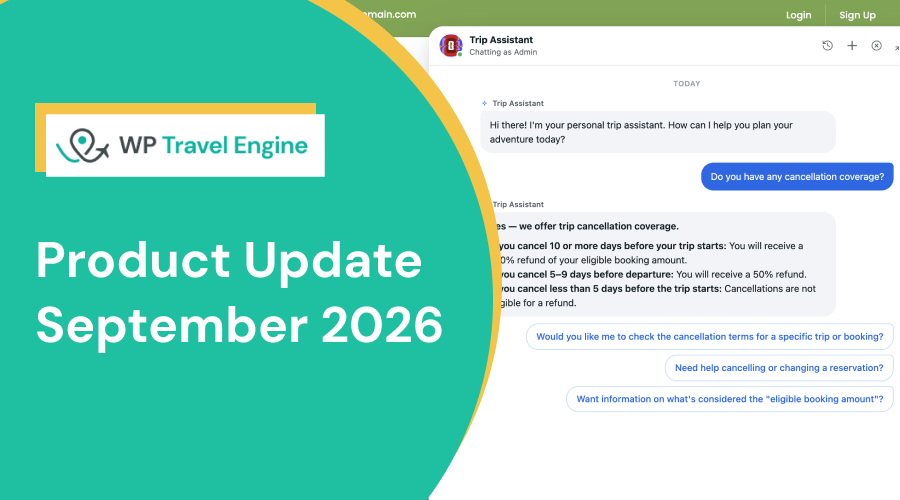
This month’s update introduces two new Altus AI modules: AI Trip Assistant to answer traveler questions and AI Agent to handle routine site tasks.
It also brings Availability Manager, a new way to manage every departure date, seat count, and price in one place.
Plus, we’ve made several other improvements and fixed several bugs.
Here’s what’s new:
New Modules in Altus AI
Last month, we shared that two more Altus AI modules were on the way. Both are now live.
AI Agent – An AI chat assistant for your team, right inside your admin dashboard. Ask it questions about your trips and bookings, or ask it to make changes like updating a price or creating a coupon. The tasks that took several clicks now take one request.
AI Trip Assistant – An AI chat assistant that travelers can use on your website. It answers their questions about your trips, prices, and dates using your own content. This way, travelers get help right away without waiting for your team.
You'll need your own API key from OpenAI, Anthropic, Google, or OpenRouter to use Altus AI.
Availability Manager
Changing seats or prices meant opening each trip and editing dates one by one. For bookings that came in by phone or email, this took more time than it should.
That’s why we built Availability Manager.
Availability Manager shows every departure for a trip in one place, with seats, bookings, and status for each date.
Click any date to change the seat count, update the price, or close the date when it’s full. Changes save without reloading the page.
For example, if a group of four books your October 12 departure over the phone, click that date and reduce the seats by four. If the date is now full, close it so no one else can book it online.
Availability Manager is available in Trip Fixed Starting Dates add-on.
Customizable Waitlist Fields
The waitlist form came with a fixed set of fields. If you needed more details from travelers, like group size or a phone number, you had to follow up with each person.
Now you can customize the waitlist form.
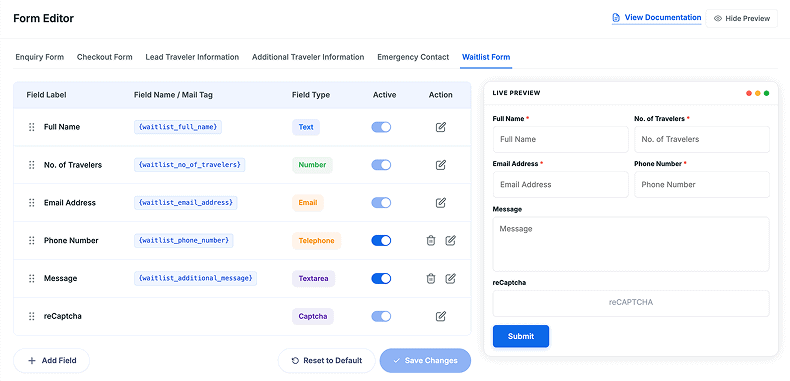
Add the fields you need, remove the ones you don’t, and change labels to match how your business works.
Travelers give you all the details when they join the waitlist. No more following up with each person.
Customizing waitlist fields requires the Form Editor add-on.
100+ Payment Gateways via PayLexer
You now have 100 payment gateways to choose from in WP Travel Engine through PayLexer.
Here are some of the new payment gateways:
If the gateway you need isn’t available yet, you can request it directly from the PayLexer website.
Other Improvements
WP Travel Engine
- Trip Archive price filters now include trips without packages when filtering trips by higher or lower prices.
- TranslatePress email compatibility now supports the new database structure.
WP Travel Engine PRO
- Admins are now notified when add-ons are outdated, with a prompt to update.
- Add-ons no longer activate when a required add-on is missing. A warning shows instead to inform the admins.
- Styling is now compatible with WordPress 7.0.
Extra Services Add-on
- Extra Services can now have an image and a badge label.
- Extra Services now display better in the booking modal for single and multiple tours.
Resource Management Add-on
- Extra Services capacity tracking now works with WPML across all translations.
- The rule builder now shows each Extra Service once, in its original language.
Price on Request Add-on
- A new “Price on Request” sort option is available on trip archive and taxonomy pages.
Stripe and Razorpay Payment Gateways
- API key testing is improved for both gateways.
- Stripe now supports test webhooks and one-click permission setup.
Bug Fixes
- Razorpay fees for international payments now show in the currency set in WP Travel Engine.
- The Departure Calendar now shows trips in all languages, not only the selected one.
- Trips without fixed departure dates no longer appear in Earlier Departure sorting.
- Price on Request trips no longer appear in price-based sorting.
- Trip Archive sorting and sidebar counts now show the right number of trips.
- Per-unit values for Extra Services now show as expected in the booking modal.
- On mobile, users can now scroll to the bottom of the page when the sticky widget is enabled.
- Extra Services capacity rules now treat the same service across translations as one service.
Conclusion
This month’s updates give you powerful AI support for your travelers and your daily site tasks, and a faster way to manage departure dates.
Update WP Travel Engine and your add-ons to the latest version to get started. If you have any questions along the way, our support team is here to help.