
We’re excited to introduce WP Travel Engine version 6.7.0, a major update that improves the checkout experience and enhances booking management. Along with these updates, two new add-ons are now available.
Improved Checkout Page
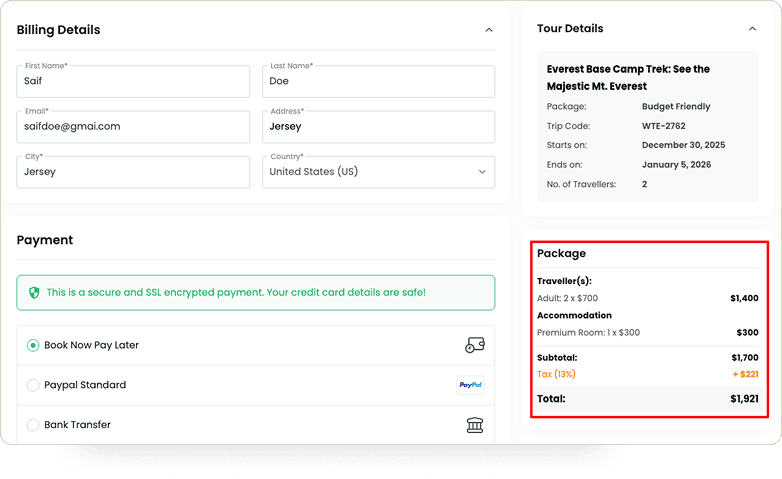
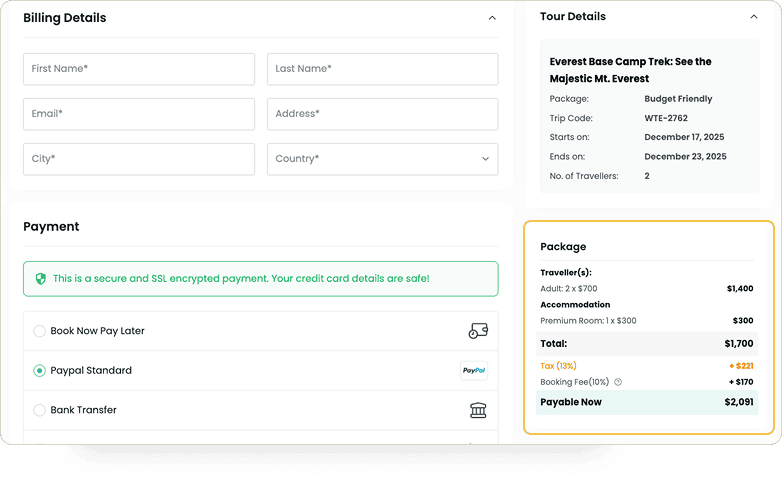
We’ve redesigned the Checkout Page to present a cleaner pricing summary and give you more control over how fees and taxes are calculated.
What’s new
- Clearer Pricing Breakdown – Your travelers now see totals presented in a logical sequence, with consistent calculations for discounts, total, deposit, booking fees, and taxes.
- New Booking Fee Setting – We’ve added a new option in the Booking Fee add-on. You can now decide whether to include booking fees when calculating taxes.
- Better Fee & Tax Handling – Based on your choice in the Booking Fee add-on, the Checkout Page automatically calculates taxes and totals. This gives you full control over how fees and taxes are applied.
Improved Booking Details Page
We’ve redesigned the Booking Details Page in the admin dashboard.
Before, creating manual bookings was tedious because entering prices was confusing, and you had to calculate totals manually.
Now, adding prices is much clearer, and totals are updated automatically.
What’s New
1. Flexible Booking Options
Previously, you could only select from existing trips when adding a new booking.
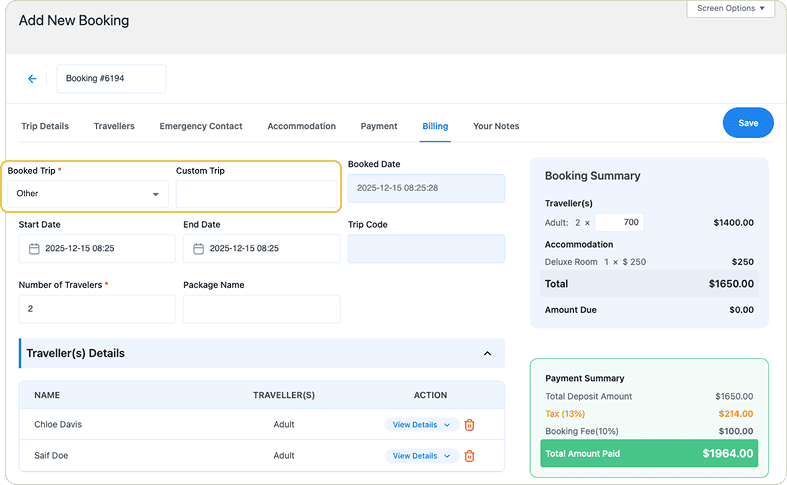
Now, you have two options: either add a custom trip or choose an existing one when creating a new booking.
2. Simpler Add-On Management
Previously, additional details, such as accommodations and extra services, had to be added from the Booking Summary.
Now, you can add them from the left-hand form, and the Booking Summary updates instantly based on the quantities and prices you enter.
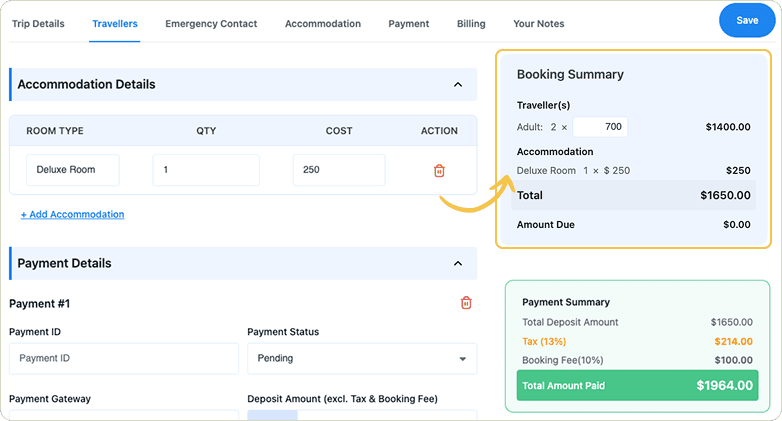
3. Automatic Total & Payment Calculation
You no longer need to calculate total prices manually.
All total prices, including traveler fees, extra details, and the overall booking total, are now calculated automatically.
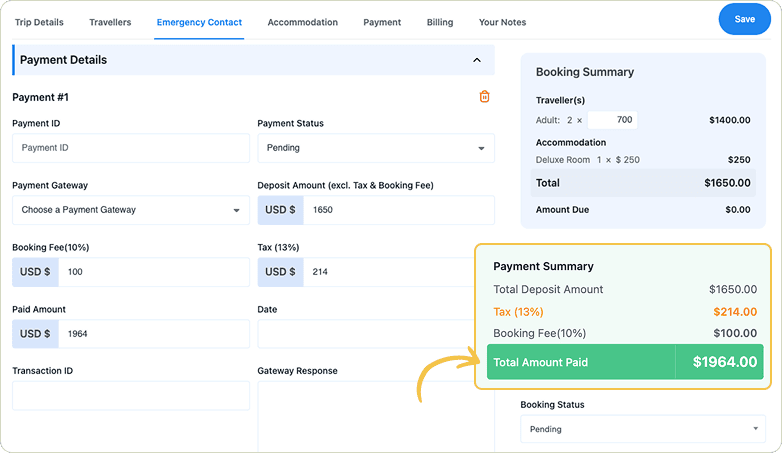
Additionally, payment amounts such as taxes and booking fees are now entered in the Payment Details section. The system automatically calculates the amount paid for each payment and displays the totals in the Payment Summary section.
Introducing Two New Add-ons
1. Waitlist Add-on
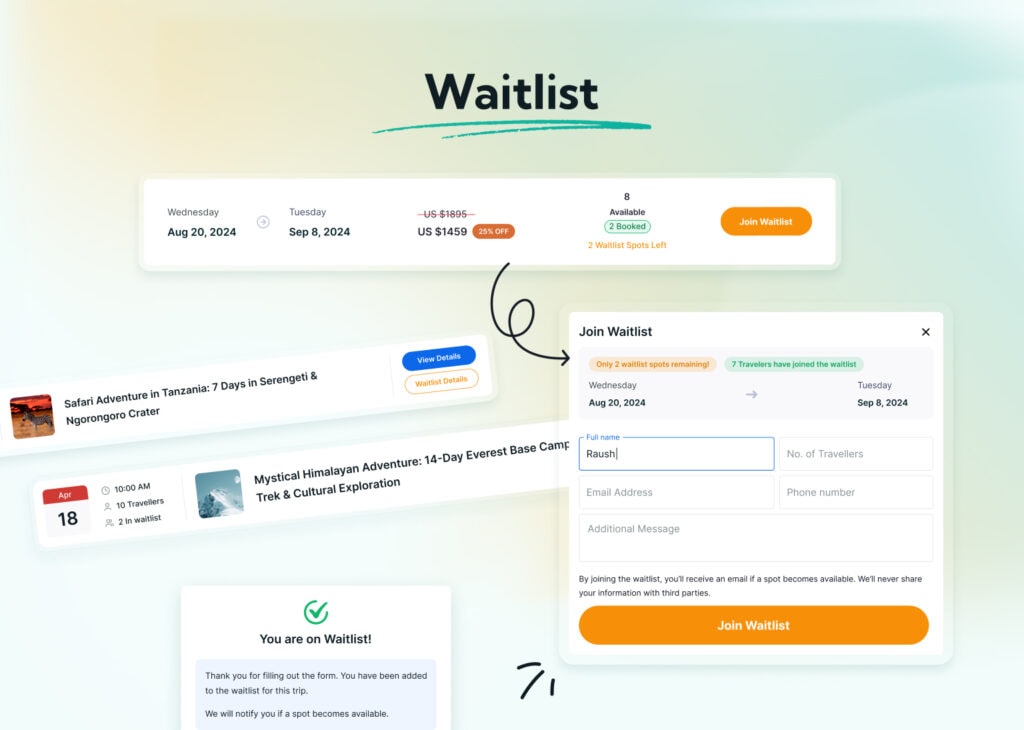
Sold-out trips don’t always mean lost interest. Many travelers are still willing to join if a seat opens later.
The Waitlist Add-on lets you collect this interest. When a trip is full, travelers can join a waitlist and stay informed if availability changes.
Key Benefits:
- Activate the waitlist only when a trip is fully booked, or open it early to gauge interest.
- View all waitlisted travelers in one place.
- Send ready-made email notifications as soon as a seat is available.
- Set a maximum number of travelers per date to manage demand smoothly.
You can manage this add-on from WP Travel Engine > Settings > Extensions > Waitlist.
2. Webhooks & API Add-On
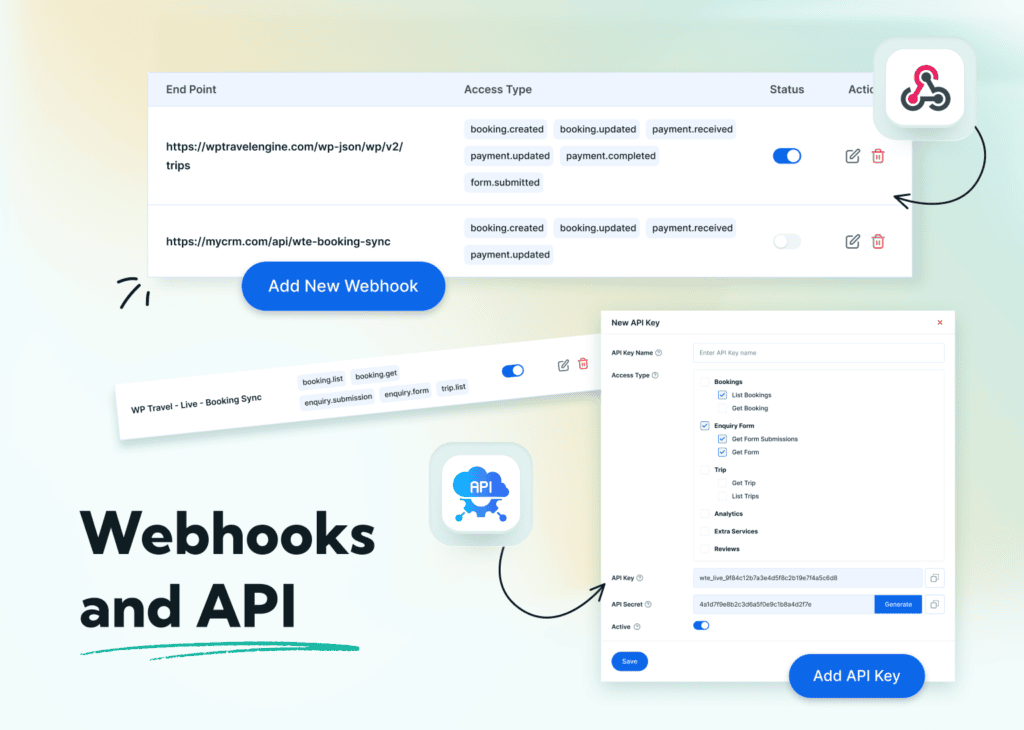
Running a travel business often means working with multiple tools at the same time. For example, your bookings might be on your website, customer details in a CRM, and reports in a spreadsheet.
Keeping everything updated manually takes time and can easily lead to missed or incorrect data.
The new Webhooks & API Add-on helps solve this problem by automatically sharing data from WP Travel Engine with the tools you already use. Once it’s set up, information flows on its own, without repeated manual updates.
You can access and configure this add-on from the WP Travel Engine settings area, under Settings > Extensions > Webhooks and API.
So, How Does This Work?
The add-on works in two ways: Webhooks and API Keys. Both help you share data, but they do it differently depending on your needs.
What is a Webhook?
A webhook is a way for WP Travel Engine to send information automatically when something happens on your website.
For example, when a new booking is made, WP Travel Engine can instantly send the booking details to a Google Sheet or another system. You don’t need to export data or take any action. The update happens on its own.
You can choose which events should send data, such as:
- New bookings
- Payments
- Customer details
- Enquiry details
- Reviews
As soon as one of these events occurs, the information is shared automatically.
What are API Keys?
API Keys allow external tools to request data from your WP Travel Engine site whenever they need it.
For example, if you work with a reporting or accounting system, it can use an API key to pull booking and payment data from WP Travel Engine automatically.
This way, your finance team can always see updated booking totals and payment status in their own system, while WP Travel Engine remains the main source of data.
You stay in control of what can be accessed, including:
- Bookings
- Payments
- Customers
- Trip information
Only the data you allow is shared, and it’s delivered securely.
If you want to learn more, check out the documentation for this add-on.
Conclusion
This release focuses on making daily work easier. Pricing at checkout is clearer. Booking management needs less manual effort. Tasks that once felt confusing are now more straightforward.
If you plan to use the new add-ons, take a few minutes to review the settings and documentation. Set them up based on how you work. If you need help at any point, our support team is ready to assist.


