How tour operators can offer rental cars without turning it into a second business is a question that comes up more than you would expect.
If you run tours, you have probably had a guest ask something like ‘Can I rent a scooter for the extra day I am staying?’ or ‘Do you have any cars available after the tour ends.’ Most tour operators say no.
Not because they could not offer it, but because setting up a real rental system feels like a completely separate business to run.
Here’s the good news: you don’t need one.
You can offer vehicle rentals as add-ons directly inside your existing tour booking flow, no separate inventory system, no second checkout, no new software subscription.
This guide walks through exactly how, and just as importantly, where this approach stops making sense, so you don’t overpromise something your website can’t actually handle.
Why Tour Operators Get Asked About Car and Bike Rentals So Often
This comes up more than people expect, for a few practical reasons.
Guests extend their trip. Someone books your 3-day hiking tour, then realizes they want two extra days in the area afterward.
A rental scooter or small car for those extra days is an easy ask and an easy yes if your system supports it.
Local transport is genuinely useful. On multi-stop city tours or island-hopping trips, a rented bike or scooter between your scheduled stops gives guests freedom during their own free time, without you having to build that into the itinerary.
It’s a natural upsell, not a hard sell. Unlike trying to sell an entirely separate product, a rental add-on sits right next to a booking someone has already decided to make.
That’s the easiest moment to add anything to a cart; the guest is already committed and already checking out.
The mistake most operators make is assuming “offering rentals” means becoming a rental company: tracking a fleet, managing daily availability per vehicle, handling damage deposits, the works.
For most tour businesses, that’s overkill. A simpler add-on model covers the actual demand without the operational weight.
How Tour Operators Can Offer Rental Cars as Add-Ons Without a Separate Booking System | Vehicle Rentals
If your site runs on WP Travel Engine, this is exactly what the Extra Services add-on is built for.
It’s not a rental-specific tool; it’s a general add-on system for anything a guest might want alongside their trip, and vehicle rental is one of the explicit use cases WP Travel Engine lists for it, right alongside airport pickup, accommodation upgrades, and meal packages.
Here’s how it actually works, based on the two service types the add-on supports.
The default service type is for a simple, single-price add-on. You’d use this for something straightforward like “Scooter Rental, per day, $25.” One name, one price, done.
An advanced service type is for offering multiple options under one service, which is what you’ll want for most vehicle rentals since guests usually have more than one choice. WP Travel Engine’s own documentation gives almost this exact example for airport pickup vehicles:
- Airport Pickup: 4-Seater Car, $30
- Airport Pickup: 10-Seater Van, $60
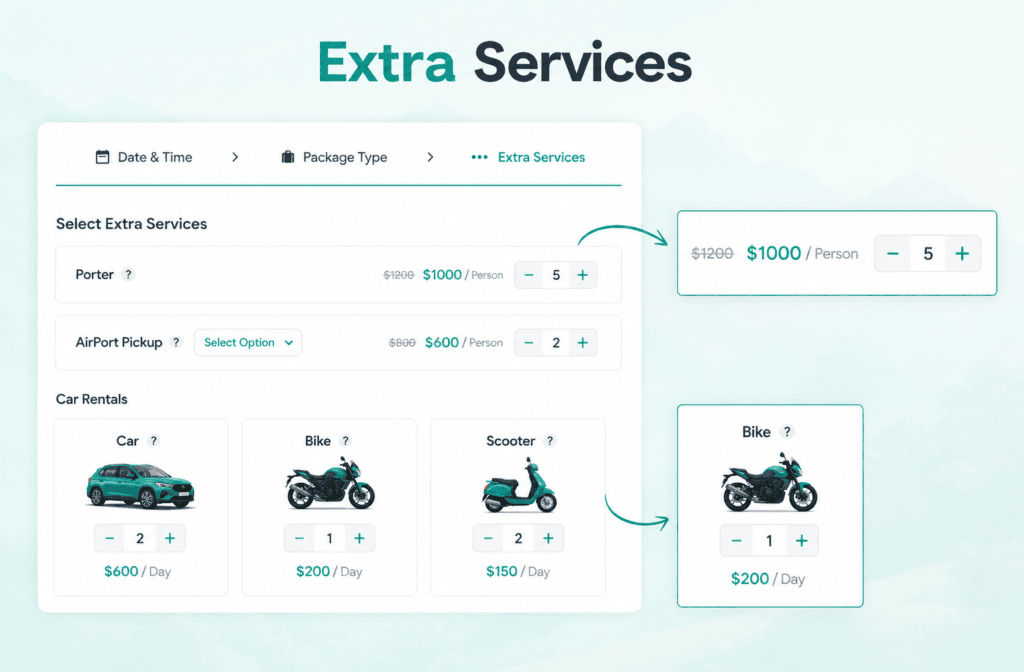
You’d set up bike, scooter, or car rentals the same way, one service with several vehicle options underneath it, each with its own price and short description.
For pricing, you get two models to choose from for each add-on:
- Per Unit – a flat price no matter how many travelers are on the booking. This fits a single rented vehicle, like one car or one scooter for the group.
- Per Traveler – the price is multiplied by the number of people on the booking. This fits something like individual bike rentals, where each traveler needs their own.
You can also mark any rental option as optional or required, so if you want to require, say, a helmet rental alongside a scooter rental, you can set that as mandatory while leaving the scooter itself optional.
Setting Up a Car, Bike, or Scooter Rental Add-On, Step by Step
Here’s the actual setup process:
1. Install the Extra Services add-on. It’s included with every current WP Travel Engine paid plan, Personal, Growth, Travel Agency, and Development Company, so if you are already on a paid plan, you likely already have access to it.
2. Set the section title. Go to WP Travel Engine → Settings → Extensions → Extra Services, and give the section a title that will show above your add-ons in the booking popup, something like “Optional Add-Ons” or “Rentals or Extras.”
3. Create the rental service. Go to WP Travel Engine → Extra Services → Add Post. Name it clearly, “Scooter Rental” or “Car Rental,” not something vague like “Extras.”
4. Choose Default or Advanced. If you’re offering just one option (one scooter type, one flat price), use Default. If you’re offering a few vehicle choices with different prices, use Advanced and add each option with its own name, cost, and pricing model.
5. Write a short, honest description for each option. Mention what’s included, fuel policy, helmet included or not, pickup location, anything a guest needs to know before adding it to their booking.
6. Assign it to the relevant trips. Go to Trips → Edit Trip → Extra Services tab, and select the rental service from the dropdown.
You can adjust the price specifically for that trip if needed, so a rental add-on can cost differently on your city tour versus your multi-day trek.
7. Save and test the checkout yourself. Click Book Now on the trip as a guest would, confirm the rental option appears clearly, that the price calculates correctly, and that it shows up properly in the booking confirmation email afterward.
It will, since Extra Services are automatically included in confirmation emails, but it’s worth checking once with real numbers.
Real Examples: Setting Up Bike, Scooter, and Car Rentals
A few concrete setups to work from:
Bike rental for a city tour (Advanced, Per Traveler):
- Standard City Bike, $10 per traveler
- Electric Bike, $22 per traveler
Since each guest likely wants their own bike, Per Traveler pricing makes sense here, the total cost scales automatically with group size.
Scooter rental for extended stays (Advanced, Per Unit):
- Manual Scooter, $18 flat
- Automatic Scooter, $25 flat
Per Unit works well here since it’s usually one scooter per booking, not one per traveler, unless every single guest genuinely wants their own.
Car rental for post-tour transport (Advanced, Per Unit, Required set to off):
- 4-Seater Sedan, $45 flat
- 7-Seater SUV, $70 flat
Keep this optional, since not every guest will want it, and make the description specific: pickup location, whether a driver is included, and fuel policy.
What This Can’t Do (So You Don’t Overpromise to Guests)
This is the part worth being upfront about, both with yourself and with your guests.
The Extra Services add-on does not include a rental-specific date range picker, a per-day proration engine, or a separate availability calendar tracking how many physical vehicles you actually have on a given day.
Pricing is either a flat per-unit amount or a per-traveler multiplier, not an automatic day-based calculation.
If a guest books a car rental for 5 days versus 2 days, the add-on itself won’t calculate that difference for you, you’d need to either set separate rental options for different day ranges (“Car Rental, 1-2 Days” and “Car Rental, 3-5 Days” as two different service options) or handle exact day pricing manually after the booking comes in.
There’s also no built-in inventory tracking that prevents you from accidentally “selling” the same physical scooter to two different guests on the same day.
If you only have three scooters, you’re responsible for watching bookings and pausing or removing the add-on once you’re fully booked for a given date; the system won’t stop that overlap automatically.
Being upfront about this with guests matters too. A short line in your rental description, like “confirm exact rental dates and availability with us directly after booking,” sets the right expectation and avoids a frustrating surprise later.
Pricing Your Rental Add-On for Profit
A few practical points, whether you own the vehicles yourself or you’re arranging them through a local partner:
Know your actual cost first. If you’re renting from a local partner and marking it up, build in a genuine margin, not just a token few dollars.
If you own the vehicles, factor in maintenance, insurance, and eventual replacement cost, not just the rental price you’ve seen competitors charge.
Price simply. Round numbers ($25, not $23.47) are easier for guests to decide on quickly during checkout and reduce the “let me think about it” hesitation that kills add-on sales.
Don’t underprice to make the upsell look attractive. A rental add-on priced too low signals it’s an afterthought rather than something genuinely valuable, and it’s much harder to raise later once guests are used to a low number.
Factor in liability coverage, not just the rental price. If you own the vehicles yourself, general liability insurance that covers damage or injury during a rental is worth having, even if it’s not legally required in your area.
This guide to rental business insurance breaks down what general liability and equipment coverage typically include, and it’s worth a read before you price anything, since an uninsured claim can wipe out months of add-on revenue in one incident.
When You’ve Outgrown Add-On Rentals (And Need Dedicated Software)
There’s a real point where this approach stops being the right fit, and it’s worth recognizing it honestly rather than forcing a workaround.
If you’re managing a genuine fleet, more than a handful of vehicles, multiple pickup and drop-off locations, real per-day or per-hour rate calculations, damage deposit holds, or fuel level check-in and check-out, that’s a dedicated car rental management system’s job, not an add-on bolted onto your tour bookings.
At that point, the rental side of your business has grown into its own operation, and treating it as a simple checkout add-on will start creating more manual cleanup work than it saves you.
For most tour operators, though, that threshold is further away than it feels.
If you are occasionally renting out three or four bikes, a couple of scooters, or arranging a car for guests extending their stay, an add-on inside your existing booking flow covers it completely, without paying for or maintaining a second system just to handle a handful of extra bookings a month.
Try It on Your Own Site
If you are already running WP Travel Engine, the Extra Services add-on is included in every current paid plan, starting with the Personal plan, so there is a good chance you already have access without buying anything new.
Head to your dashboard, set up your first rental option using the steps above, and test it on one trip before rolling it out everywhere.
If you are not on WP Travel Engine yet and you are comparing tour booking plugins, this kind of flexible add-on system is worth checking out directly; not every plugin lets you attach optional extras this cleanly to a booking.
You can see the full feature breakdown and current pricing on the WP Travel Engine pricing page, or read the complete setup walkthrough in the Extra Services documentation.
Most guests won’t ask for a rental add-on. But for those who do, having a simple “yes” ready instead of “no” or a clunky manual workaround is an easy way to capture revenue you’re currently turning away.
Key Takeaway
This article isn’t saying WP Travel Engine is built to be a car rental system. It isnot, and it was never meant to be one.
What this is about is simple: giving guests everything they need in one place, so booking with you feels easy instead of scattered across five different websites and a phone call to a local rental shop.
When a guest can add a scooter, a bike, or a car to their tour booking in the same checkout, they don’t have to go hunting elsewhere, and every extra step you remove is one less reason for them to abandon the booking altogether.
That convenience does two things for your business. It adds a genuine new revenue line from bookings you are already getting, money you’d otherwise be turning away with a “sorry, we don’t offer that.
And it increases the chances that a guest completes the booking in the first place, since an all-in-one checkout feels more trustworthy and less like extra work than a fragmented one.
This is written for tour operators and travel agency owners who already run trips and want to earn more from the guests they’re already booking, not for anyone looking to start a standalone car rental business. If that’s what you’re building, you need dedicated rental software, not a tour plugin add-on.
Frequently Asked Questions
Can I offer vehicle rentals as add-ons without a developer’s help?
Yes. Setting up the Extra Services add-on is a dashboard task, no coding required. You create the service, set a price, and assign it to a trip, all through the same WordPress admin area you already use to manage your tours.
Extra Service: WP Travel Engine’s one of the useful add-ons for upselling.
Do I need to own the cars, bikes, or scooters myself?
No. Many operators partner with a local rental shop and mark up the price slightly, rather than owning and maintaining the vehicles themselves.
The add-on just needs a name, a price, and a description; it doesn’t care whether you own the vehicle or arrange it through someone else.
Can guests rent a vehicle without also booking a tour?
Not through this setup. Extra Services are attached to a trip booking, so a guest adds the rental while booking a tour; they can’t check out for a rental alone through this flow.
If you want a standalone rental checkout with no tour attached, that’s outside what this add-on is built for.
What happens if two guests try to rent the same vehicle on the same day?
Yes, this can happen, and it’s worth being clear about. If you only have one car, one scooter, or one specific unit, and you offer it as a rental add-on, the system will let two different guests both add that same option to their bookings for the same date.
It doesn’t check whether that exact vehicle is already taken on that day, it just adds the service to checkout as if it’s always available.
So if you truly have only one of something, you need to watch your bookings yourself and remove or pause that rental option once it’s booked for a given date, otherwise you risk promising the same car to two guests at once. This only becomes a real issue when you’re offering a single unit of something.